

How Processor Architecture Affects AI Models
Processor architecture directly impacts the performance, cost, and energy efficiency of AI models. Different types of processors are optimized for specific AI tasks, from training large models to running inference on edge devices. Here's a quick breakdown:
- CPUs: Best for managing sequential tasks like data preprocessing, orchestration, and smaller AI models (<1.5B parameters). Cost-efficient but slower for parallel tasks.
- GPUs: Ideal for deep learning and large-scale parallel computations. Faster than CPUs but consume significantly more power.
- TPUs: Specialized for tensor operations, offering high efficiency and scalability for massive models. Great for large-scale training and inference.
- NPUs: Designed for edge inference, providing excellent energy efficiency for mobile and IoT devices.
- FPGAs: Tailored for ultra-low latency tasks with reconfigurable hardware.
- Neuromorphic Chips: Modeled after the human brain, perfect for energy-efficient real-time tasks like voice recognition.
Key Takeaways:
- Performance: GPUs and TPUs excel in parallelism, while CPUs handle sequential tasks better.
- Energy Use: TPUs and NPUs are more efficient than GPUs, especially for edge or large-scale tasks.
- Cost: CPUs are cheaper hourly, but GPUs and TPUs complete tasks faster, often reducing overall costs.
- Use Case: Match your processor to the AI workload (e.g., GPUs for large models, NPUs for mobile inference).
Choosing the right processor ensures optimal performance and cost-efficiency for your AI projects.
Why Every Company is Building Their Own AI Chips
sbb-itb-903b5f2
How CPUs Work in AI Applications
CPUs are the all-rounders of computing hardware, designed with a relatively small number of powerful cores - ranging from 4 to 64 in consumer devices and up to 128 in high-end server models. These cores are optimized for single-threaded tasks with low latency, leveraging features like branch prediction, out-of-order execution, and multi-level caches (L1–L3) to keep frequently accessed data close at hand.
Modern CPUs can predict conditional outcomes with an impressive accuracy of over 95%, allowing them to handle complex branching logic effectively. This makes them particularly useful for tasks that don’t align well with GPU strengths. CPUs also play a key role in orchestrating data flows, such as sharding, indexing, and feeding data to accelerators, ensuring smooth workflows without bottlenecks. While CPUs shine in specific areas of AI, they also have their limitations.
What CPUs Do Well for AI
CPUs excel at handling the "outer loop" of AI operations, such as data preprocessing tasks. These include loading datasets (like CSV files), cleaning and organizing text, performing feature engineering, and merging database tables. Unlike GPUs, which thrive on parallelism, these operations are sequential and I/O-bound, making CPUs a better fit. CPUs are also essential for system-level tasks like request routing, load balancing, and monitoring container health.
For smaller AI models - those with fewer than 1.5 billion parameters - CPUs can even outperform GPUs, beating them by about 1.31× in optimized setups. This is because CPUs avoid the overhead of transferring data to GPUs and launching kernels, making them ideal for low-latency scenarios like answering a single chatbot query. Traditional machine learning algorithms, such as random forests, linear regression, and gradient boosting, are also typically CPU-driven. In reinforcement learning, CPUs are indispensable for running simulations that require tasks like code compilation, mathematical verification, and physics calculations.
Another advantage is energy efficiency. A typical CPU server consumes around 500 to 800 watts, significantly less than a high-end GPU server like the NVIDIA DGX H100, which can draw up to 10,200 watts. This makes CPUs a cost-effective choice for orchestrating AI workflows and managing tasks where energy use and sequential processing matter most. However, when it comes to highly parallel tasks, CPUs face notable challenges.
Where CPUs Fall Short in AI
While CPUs excel at sequential tasks, they struggle with the parallel computations that are the backbone of deep learning. Even the most advanced server CPUs, with up to 128 cores, can’t compete with GPUs, which pack over 16,000 smaller cores. This creates a massive gap in throughput for tasks requiring heavy parallelism.
CPUs also fall short in memory bandwidth, which is critical for handling the large tensors involved in model training. For example, a CPU’s memory bandwidth is about 460 GB/s, whereas a GPU delivers approximately 3,350 GB/s. This bandwidth difference allows GPUs to process deep learning tasks up to 250 times faster than CPUs.
Cost is another factor. While a 64-core cloud CPU costs between $0.10 and $0.50 per hour, compared to $1.49 to $6.98 per hour for a high-end GPU, the extended time required for CPUs to complete large, parallel tasks can make them up to 10 times more expensive overall. Despite their growing role in orchestration tasks and reinforcement learning, CPUs simply weren’t designed for the heavy tensor calculations that drive modern AI.
How GPUs Improve AI Performance
When it comes to overcoming the limitations of CPUs, GPUs offer a game-changing solution thanks to their ability to handle high levels of parallelism. To truly harness their potential, it's important to understand how GPU architecture works and why it’s so effective for AI tasks. Unlike CPUs, which are designed for sequential operations, GPUs excel at handling large-scale parallel computations. This difference in design leads to massive performance improvements - GPUs can train AI models up to 250 times faster than CPUs. With over 16,000 specialized cores, GPUs are built to process vast amounts of data simultaneously. Let’s dive into how GPUs achieve this level of efficiency.
"The GPU is an assembly line of workers. Each one does one operation: multiply two numbers and add the result... when every row in a massive spreadsheet needs the same formula applied, they finish before the engineer even gets started." - Paolo Perrone, The AI Engineer
Another critical factor is memory bandwidth. For example, an NVIDIA H100 GPU boasts 3.35 TB/s of memory bandwidth, which is about 67 times faster than the DDR5 memory found in typical laptops. This speed is crucial because processors can become idle if they have to wait for data - a bottleneck often referred to as the "Memory Wall".
How GPUs Handle Parallel Processing
GPUs are tailor-made for the kinds of mathematical operations that dominate AI workloads. Neural networks, for instance, rely heavily on matrix multiplication, a task GPUs are designed to perform billions of times during training and inference. To handle this efficiently, modern GPUs include specialized hardware like Tensor Cores, which can perform entire 4x4 or 8x8 matrix multiplications in just one clock cycle. The NVIDIA H100, for instance, features 528 fourth-generation Tensor Cores in addition to its 16,896 CUDA cores.
This design is a perfect match for the demands of AI. For instance, training a model with 70 billion parameters requires over 140 trillion floating-point operations for just one forward pass. GPUs handle this load by breaking tasks into smaller, independent calculations and assigning them to thousands of cores at the same time.
The architecture relies on a Single Instruction, Multiple Data (SIMD) model, where thousands of cores execute the same operation across different pieces of data simultaneously. To keep up with this processing power, GPUs use High Bandwidth Memory (HBM), which stacks DRAM to achieve transfer speeds exceeding 3 TB/s. This combination of parallel cores, specialized matrix engines, and ultra-fast memory creates an ideal setup for deep learning tasks.
When to Use GPUs for AI
While GPUs are incredibly efficient, whether or not to use them depends on the size of your AI model. For models with fewer than 1.5 billion parameters, CPUs can sometimes outperform GPUs by as much as 1.31 times, as the time spent transferring data to the GPU may outweigh the computational benefits. However, for larger models, GPUs are indispensable.
Take OpenAI’s GPT-4, for example. Training this model required a cluster of over 10,000 GPUs to process trillions of tokens. On CPUs, this task would have taken decades, but GPUs reduced it to just months. By 2024, OpenAI’s inference costs had reached $2.3 billion, reflecting the scale of GPU-powered operations required to serve millions of concurrent users. Similarly, Uber switched from a CPU-based XGBoost ensemble to "DeepETA," a GPU-powered deep learning model, enabling it to handle hundreds of thousands of arrival time predictions per second worldwide.
GPUs are the go-to choice for training large-scale language models, running real-time inference for high user volumes, generating images, and performing 3D rendering. Of course, this power comes with significant energy demands - an 8-GPU H100 cluster consumes around 10,200 watts, compared to just 500–800 watts for a typical CPU server. But for platforms like NanoGPT, which supports tools like ChatGPT, Deepseek, Gemini, Flux Pro, Dall-E, and Stable Diffusion, the ability to process tasks in parallel makes GPUs essential for delivering fast, scalable AI services.
TPUs and Other Specialized Processors
GPUs have been a game-changer for AI, but the industry hasn’t stopped there. Specialized processors designed specifically for machine learning, like Google's Tensor Processing Units (TPUs) and neuromorphic chips, have taken efficiency to the next level.
How TPUs Work for AI
TPUs are Application-Specific Integrated Circuits (ASICs) built to handle machine learning tasks with precision and efficiency. Unlike CPUs and GPUs, which constantly pull data from memory for every calculation, TPUs use a systolic array architecture. This setup allows data to flow seamlessly through thousands of interconnected multiply-accumulate units, eliminating the need for repeated memory access. The result? Lower power consumption and a solution to memory bottlenecks.
At the heart of TPUs is the Matrix Multiplication Unit (MXU), capable of performing 16,384 multiply-accumulate operations per cycle. TPUs also feature SparseCores, which are optimized for handling models heavy on embeddings, such as recommendation systems. These cores provide a 5×–7× speed boost. The TPU v6e (Trillium), for example, delivers 918 TFLOPs of bfloat16 performance - a 4.7× improvement over its predecessor - while using 67% less energy.
TPUs also scale exceptionally well. TPU Pods can connect up to 9,216 chips, offering near-linear performance scaling thanks to custom Inter-Chip Interconnects (ICI). These interconnects provide 13 TB/s per chip, which is 600 times faster than standard 50 GB/s Ethernet. By comparison, GPU clusters often hit performance bottlenecks beyond 512 chips. This scalability makes TPUs ideal for training massive Transformer models and managing high-volume inference workloads.
"GPUs are the Swiss Army knife of computing; TPUs are a scalpel for AI." - Adrien Laurent, IntuitionLabs
Google demonstrated the power of TPUs in November 2025 with Gemini 3, a multimodal model boasting a 1-million-token context window. The model was both trained and deployed entirely on TPU v5e and v6e pods, bypassing third-party GPUs. Other companies, like AssemblyAI, have also embraced TPUs, reporting 4× better throughput-per-dollar after migrating their speech recognition inference workloads to TPU v5e in 2026. Similarly, Gridspace, a conversational AI firm, achieved a 5× training speedup and scaled inference by 6× after switching to TPUs.
TPUs shine in large-scale training of language models, offering 4× better cost-per-inference compared to NVIDIA H100 GPU setups. Pricing ranges from $1.35 to $8.00 per hour, depending on the configuration. However, GPUs still hold an edge in flexibility, making them a better choice for research, experimentation, and tasks requiring custom code or broad framework compatibility. Looking ahead, neuromorphic chips promise even more advancements in AI hardware efficiency.
Neuromorphic Chips and Future Processors
Neuromorphic chips take inspiration from the human brain, mimicking the behavior of neurons and synapses. These chips use event-driven architectures, where artificial neurons activate only when needed. This design is perfect for energy-efficient, real-time tasks like voice recognition and image processing.
One practical example of this approach is Neural Processing Units (NPUs). These chips enable low-latency, energy-efficient inference directly on edge devices like smartphones and IoT sensors, eliminating the need to send data to the cloud. This approach reduces latency, cuts bandwidth costs, and boosts user privacy - especially important for devices with limited battery life.
As AI shifts from centralized data centers to edge devices, specialized processors are becoming more critical. The move toward inference-first architectures is accelerating, with processors like TPU v7 (Ironwood) expected to consume 60–65% less power than comparable GPUs while maintaining high throughput. For platforms like NanoGPT, which prioritize local data storage for privacy, these energy-efficient processors open the door to running advanced AI models directly on user devices. This evolution highlights the growing importance of choosing the right processor for each AI workload, ensuring optimal performance and efficiency.
Comparing Different Processor Types for AI
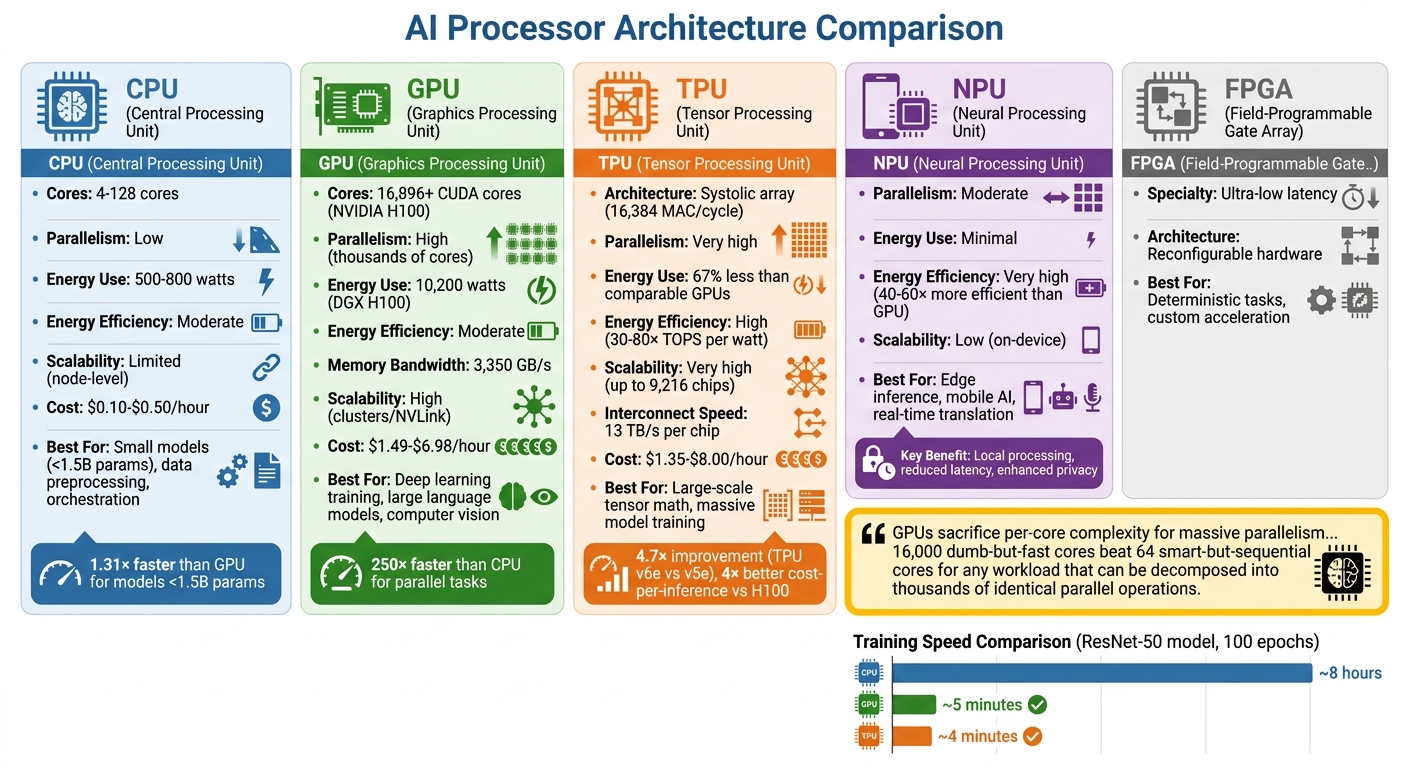
AI Processor Types Comparison: CPU vs GPU vs TPU vs NPU Performance and Use Cases
The type of processor you choose can greatly influence training costs, energy consumption, and overall performance. CPUs are versatile, featuring 4–128 robust cores optimized for tasks requiring sequential logic and complex decision-making. GPUs, on the other hand, excel at parallel processing. With thousands of smaller cores - like the NVIDIA H100's 16,896 CUDA cores - they're built to handle large-scale operations on datasets simultaneously. TPUs go even further, using specialized systolic array architectures tailored for high-volume matrix and tensor computations.
Understanding these differences is key to matching processor capabilities with AI workload demands.
"GPUs sacrifice per-core complexity for massive parallelism... 16,000 dumb-but-fast cores beat 64 smart-but-sequential cores for any workload that can be decomposed into thousands of identical parallel operations." - GPUnex Research Team
The performance disparity between these processors is striking. For example, training a ResNet-50 model over 100 epochs takes about 8 hours on a 16-core CPU. In contrast, an NVIDIA H100 GPU can complete the same task in roughly 5 minutes, and a TPU v5e finishes it in just 4 minutes. However, for smaller AI models (under 1.5 billion parameters), CPUs can outperform GPUs by approximately 1.31× due to their ability to bypass the overhead of data transfers.
Energy efficiency is another critical factor. A modern GPU server like the NVIDIA DGX H100 uses around 10,200 watts at peak, compared to 500–800 watts for a CPU-only server. TPUs shine in this area, delivering 30–80× more TOPS (Tera Operations Per Second) per watt for inference tasks. For mobile AI applications, NPUs are even more efficient, offering 40–60× the energy savings of GPUs, making them perfect for edge devices where battery life is a priority.
Performance Comparison Table
Here’s a quick snapshot of how these processor types stack up:
| Architecture | Parallelism | Energy Efficiency | Scalability | Best Use Case |
|---|---|---|---|---|
| CPU | Low (4–128 cores) | Moderate | Limited (node-level) | Small models (<1.5B params), data preprocessing, orchestration |
| GPU | High (thousands of cores) | Moderate | High (clusters/NVLink) | Deep learning training, large language models, computer vision |
| TPU | Very high (systolic array) | High | Very high (multi-chip pods) | Large-scale tensor math, massive model training |
| NPU | Moderate | Very high | Low (on-device) | Edge inference, mobile AI, real-time translation |
Cost also plays a big role in decision-making. For instance, running an NVIDIA H100 GPU on cloud platforms costs between $1.49 and $6.98 per hour, while a 64-core CPU runs for about $0.10–$0.50 per hour. But hourly rates don’t tell the whole story - total job costs often determine the best hardware for your needs. For tools like NanoGPT, which focus on local processing and privacy, balancing these trade-offs ensures a cost-effective setup tailored to specific AI workloads.
These insights highlight the importance of aligning processor choice with your AI model's requirements, helping you make informed decisions about hardware for your projects.
How to Select Hardware for Your AI Models
Evaluating Your AI Workload Requirements
Start by identifying your specific AI use case. A key consideration is ensuring your model fits within the VRAM capacity of your hardware. If it doesn’t, the system will rely on slower CPU inference instead. For instance, a 70B parameter model using 4-bit quantization requires around 40–48GB of VRAM or unified memory. On the other hand, smaller models like an 8B parameter model can run with just 5GB of VRAM.
Next, determine whether your focus is on training or inference. Training requires substantial parallelism and high memory bandwidth, making GPUs like the H100 or A100, or even TPUs, ideal for the task. Inference, however, has two phases: the prefill phase (processing the input prompt), which is compute-intensive, and the decode phase (generating tokens), which relies heavily on memory bandwidth. For example, an RTX 4090 with a bandwidth of 1,008 GB/s can generate tokens approximately 15 times faster than a system using DDR5 RAM at 96 GB/s.
To optimize memory usage, 4-bit quantization (Q4_K_M format) can reduce memory needs by up to 75% while maintaining 97–99% of the model's quality. Additionally, longer context lengths require more VRAM for storing the key–value cache. For example, a 7B model may need around 2GB of VRAM for a 4K context and up to 4.5GB for a 32K context.
This foundational analysis helps you balance hardware performance, cost, and data privacy.
Weighing Cost, Performance, and Privacy
Building a local AI setup involves an upfront investment ranging from $600 to $5,000, but it eliminates ongoing API expenses. For example, a $1,000 GPU can pay for itself within 6–8 weeks of continuous use.
Here’s a breakdown of hardware options based on budgets:
- Entry-level builds ($600–$1,200): Equipped with an RTX 4060 Ti (8GB–16GB VRAM), these systems handle 3B–8B models at speeds of 10–20 tokens per second.
- Mid-range builds ($1,500–$2,500): Featuring GPUs like the RTX 4070 Ti Super (16GB) or a used RTX 3090 (24GB), these setups can efficiently run 14B–32B models.
- High-end builds ($3,000–$5,000): Using GPUs such as the RTX 5090 (32GB) or RTX 4090 (24GB), these systems are capable of running 70B models with quantization.
Local hardware has the added advantage of keeping sensitive data - like legal documents, medical records, or proprietary code - securely on your device. This eliminates the risks associated with cloud providers, such as data retention policies and potential breaches. While cloud AI solutions may boast faster speeds with datacenter GPUs, they require a stable internet connection and involve sending data to third-party servers.
High-performance AI setups can consume 600–800 watts under heavy load, translating to monthly electricity costs of $50–$150. For a more energy-efficient alternative, consider Apple Silicon. For example, an M4 Mac Mini uses just 50 watts under load compared to the 350 watts drawn by an RTX 3090. Additionally, the M2 Ultra with 192GB of unified memory can handle large 70B+ models, which would otherwise require over $10,000 in GPU hardware.
Once you’ve narrowed down your cost and privacy priorities, it’s time to benchmark your options.
Testing Local vs. Cloud Hardware
After assessing your workload and weighing your options, it’s crucial to test both local and cloud setups to validate your choice. Cloud GPU rentals are a practical way to test performance without committing to expensive hardware. Platforms like Lambda Labs or RunPod let you test specific model sizes at a fraction of the cost. For instance, running an H100 80GB GPU costs about $1.50 per hour on decentralized platforms, compared to $11.06 per hour on major providers like AWS or GCP. Spending a few hours benchmarking your workload can help you pinpoint the right hardware.
For local testing, tools like Ollama, LM Studio, or llama.cpp can measure tokens per second on your hardware. A smooth reading experience typically requires 10–20 tokens per second, while speeds exceeding 40 tokens per second are considered excellent. As Hardwarepedia explains:
"Memory bandwidth - not compute power, not CPU speed - is the single most important spec for local AI".
If you’re testing CPU-only inference, always use dual-channel RAM (two memory sticks). Using a single stick halves your bandwidth, significantly slowing inference. Match your hardware to your model size - for example, 8GB of VRAM for 8B models, 16GB for 14B models, and 24GB for 32B models.
Conclusion
Processor architecture plays a crucial role in how effectively AI models perform. CPUs are great for handling preprocessing and managing tasks but lack the parallel processing power needed for deep learning. GPUs, on the other hand, dominate in training and inference, offering the memory bandwidth and computational strength that most models require. TPUs shine in large-scale tensor operations within specific ecosystems, while NPUs are ideal for edge inference, keeping data local while minimizing power consumption. FPGAs cater to specialized use cases, excelling in ultra-low latency and deterministic tasks.
The variety of hardware options means that choosing the right processor depends entirely on the task at hand. Matching processor capabilities to workload needs is critical. For instance:
- Large models benefit from GPUs or TPUs due to their high parallel processing and memory bandwidth.
- Edge inference thrives with NPUs, thanks to their efficiency and localized data handling.
As Fluence aptly put it:
"A poorly matched processor can double training costs, extend iteration time, or waste power on workloads that demand precision over parallelism".
Another key consideration is VRAM capacity. While 24GB is sufficient for most local AI projects, models with 70 billion parameters or more may require 40GB or higher, especially when using quantization. Memory bandwidth is also crucial for tasks like language modeling, where faster token generation depends on how quickly data moves. For example, the RTX 4090, with its 1,008 GB/s bandwidth, far outpaces systems that rely on standard RAM.
Cost and performance go hand in hand. Local hardware can become cost-effective within 6–8 weeks of consistent use, though cloud-based solutions may be better for occasional experiments. Decentralized GPU marketplaces can significantly reduce cloud costs - by as much as 70–85% compared to traditional providers.
For those who value privacy, platforms like NanoGPT offer flexible, pay-as-you-go access to AI models while ensuring local data storage. Whether you're running models on local hardware or exploring cloud options, understanding processor architecture is essential for achieving the right balance of performance, cost, and data security. Selecting the right processor isn't just a technical choice - it's the foundation for unlocking the full potential of your AI projects.
FAQs
How do I choose between a GPU and a TPU for my workload?
Choosing between a GPU and a TPU comes down to what your AI application requires. GPUs are incredibly flexible, making them perfect for a variety of tasks, including both training and inference. They also benefit from a well-established ecosystem that supports a wide range of applications. On the other hand, TPUs are purpose-built for tensor operations, making them shine when working with large-scale neural networks. They’re also known for being more energy-efficient, but they might not offer the same level of adaptability as GPUs. If your priority is flexibility, a GPU is the way to go. For tasks that demand maximum performance in tensor computations, a TPU is the better choice.
How much VRAM do I need to run an LLM locally?
To use a large language model (LLM) on your local machine, you’ll need sufficient VRAM (Video RAM). For models with 1.1 billion parameters, about 4GB of VRAM is necessary when using Q4 quantization. Bigger models demand more resources: an 8 billion parameter model typically requires 5GB of VRAM, while a 13 billion parameter model needs at least 8GB. Make sure your hardware is up to the task to ensure smooth operation.
Why does memory bandwidth matter so much for token speed?
Memory bandwidth plays a key role in the performance of AI models, particularly large language models (LLMs). It determines how quickly data can travel between memory and the processor. When running inference, these models need to access massive amounts of parameters from memory for every token they generate. If the memory bandwidth is too low, it creates bottlenecks that slow down token generation, even when using high-performance GPUs. By ensuring high memory bandwidth, data transfer speeds up significantly, leading to faster token generation - especially when running models on local hardware.