Using OpenHands with Bitcoin.com AI
Want to use OpenHands with Bitcoin.com AI? Here's all you need to know.
Setup Instructions
- Get your API key from nano-gpt.com/api
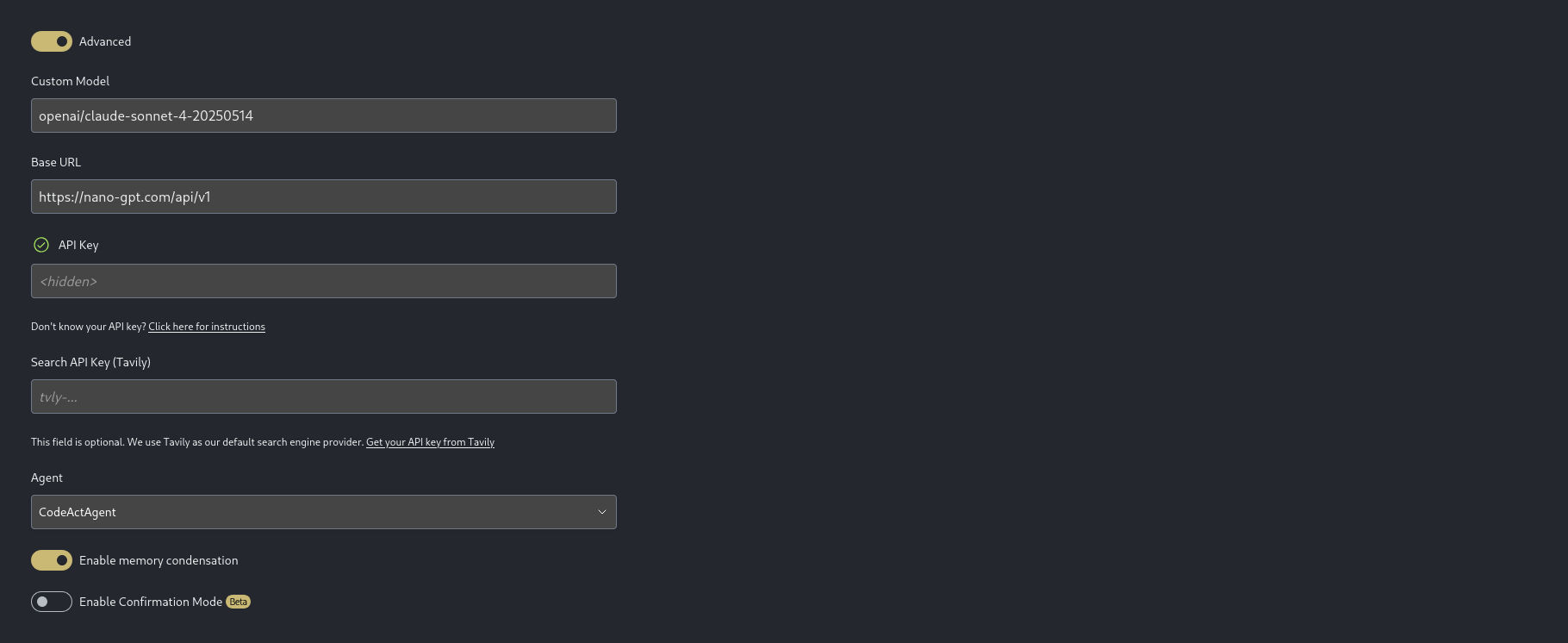
- In OpenHands, go to Settings → LLM Endpoints → Add Endpoint, then enable Advanced.
- Fill in the fields as follows:
- API Provider: OpenAI Compatible
- Base URL: https://nano-gpt.com/api/v1 (no trailing slash)
- API Key: Your key from step 1
- Model ID:
openai/[[model name as reported by Bitcoin.com AI]](include any/if present)- Examples:
openai/o1,openai/claude-3-5-sonnet-20241022,openai/gpt-4o,openai/deepseek/deepseek-chat
- Examples:
- Save and select this endpoint as your default in OpenHands.
That's it! You can now use OpenHands with any model offered by Bitcoin.com AI. Model names are on our pricing page.
Important notes
- The Base URL must NOT end with a
/. - The Model ID must be prefixed with
openai/and should match the model name exactly as reported by Bitcoin.com AI, including any nested segments likedeepseek/deepseek-chat.
Need a visual guide? See the screenshot below.