

Best Free and Paid AI Image Generators in 2026
AI image generators in 2026 are powerful tools for creators, offering options for all budgets and needs. Whether you're looking for free tools for casual use or paid platforms for professional projects, there's something for everyone. Key highlights include:
- Free tools like ChatGPT's free tier, Microsoft Designer, and Ideogram offer limited but useful features for beginners and casual users.
- Paid platforms like Midjourney, Adobe Firefly, and NanoGPT cater to professionals, focusing on quality, privacy, and commercial rights.
- NanoGPT's pay-as-you-go model stands out, letting users access multiple AI models without subscriptions.
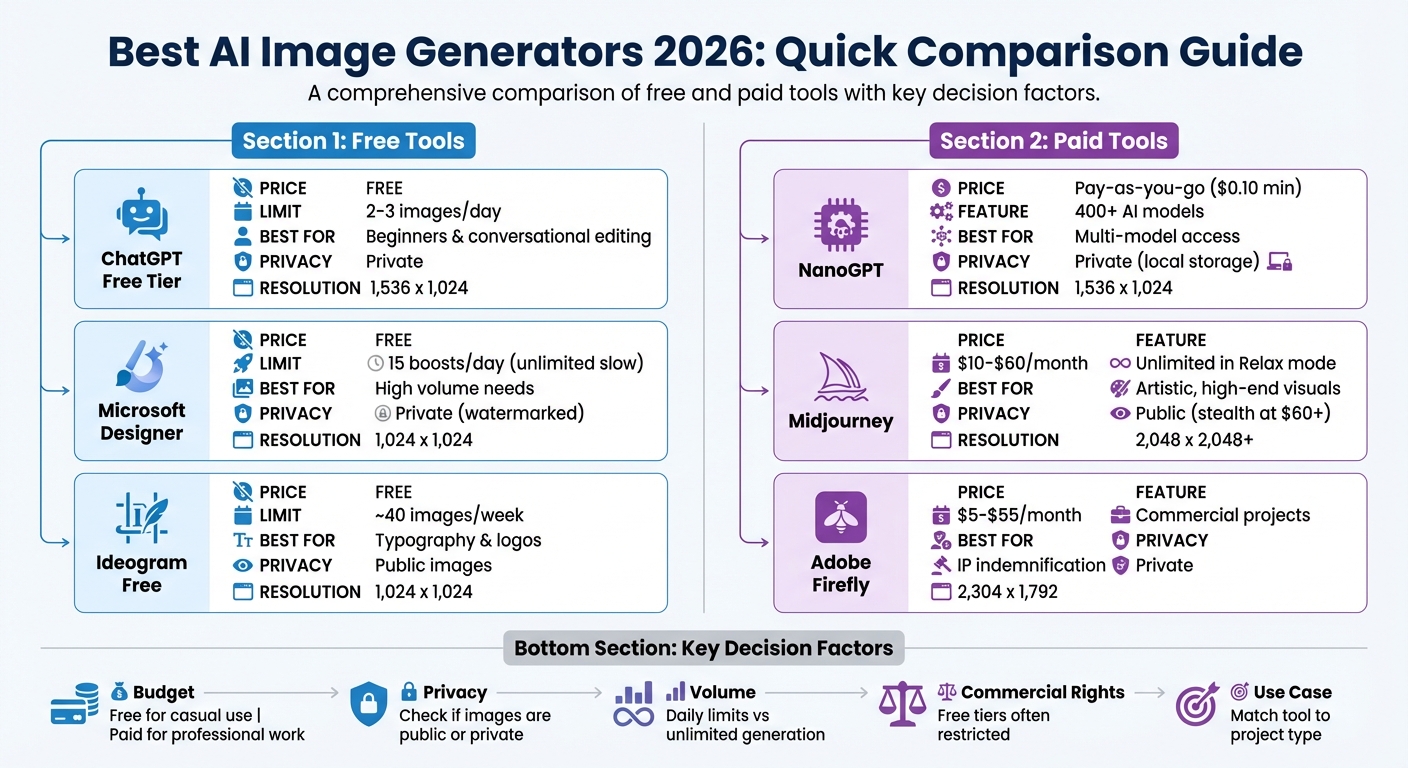
Quick Comparison
| Tool | Pricing | Best For | Key Limitation |
|---|---|---|---|
| ChatGPT (Free Tier) | Free | Beginners, conversational editing | Low daily image limit |
| NanoGPT | $0.10 minimum deposit | Flexible, multi-model access | Requires credit management |
| Midjourney | $10–$60/month | Artistic, high-end visuals | Public images unless on Pro plan |
| Adobe Firefly | $5–$55/month | Commercial projects, IP safety | Slower generation times |
| Ideogram (Free Plan) | Free | Typography, text-in-images | Public images on free tier |
For occasional users, NanoGPT's credit system is ideal. Professionals might prefer Adobe Firefly for commercial safety or Midjourney for artistic output. Free options like ChatGPT and Ideogram are great for experimenting but come with limitations like public images or low resolution. Choose based on your budget, privacy needs, and project type.
AI Image Generator Comparison 2026: Free vs Paid Tools
AI Image Generators Ranked from Worst to Best (2026)
sbb-itb-903b5f2
NanoGPT Pay-As-You-Go Image Generation
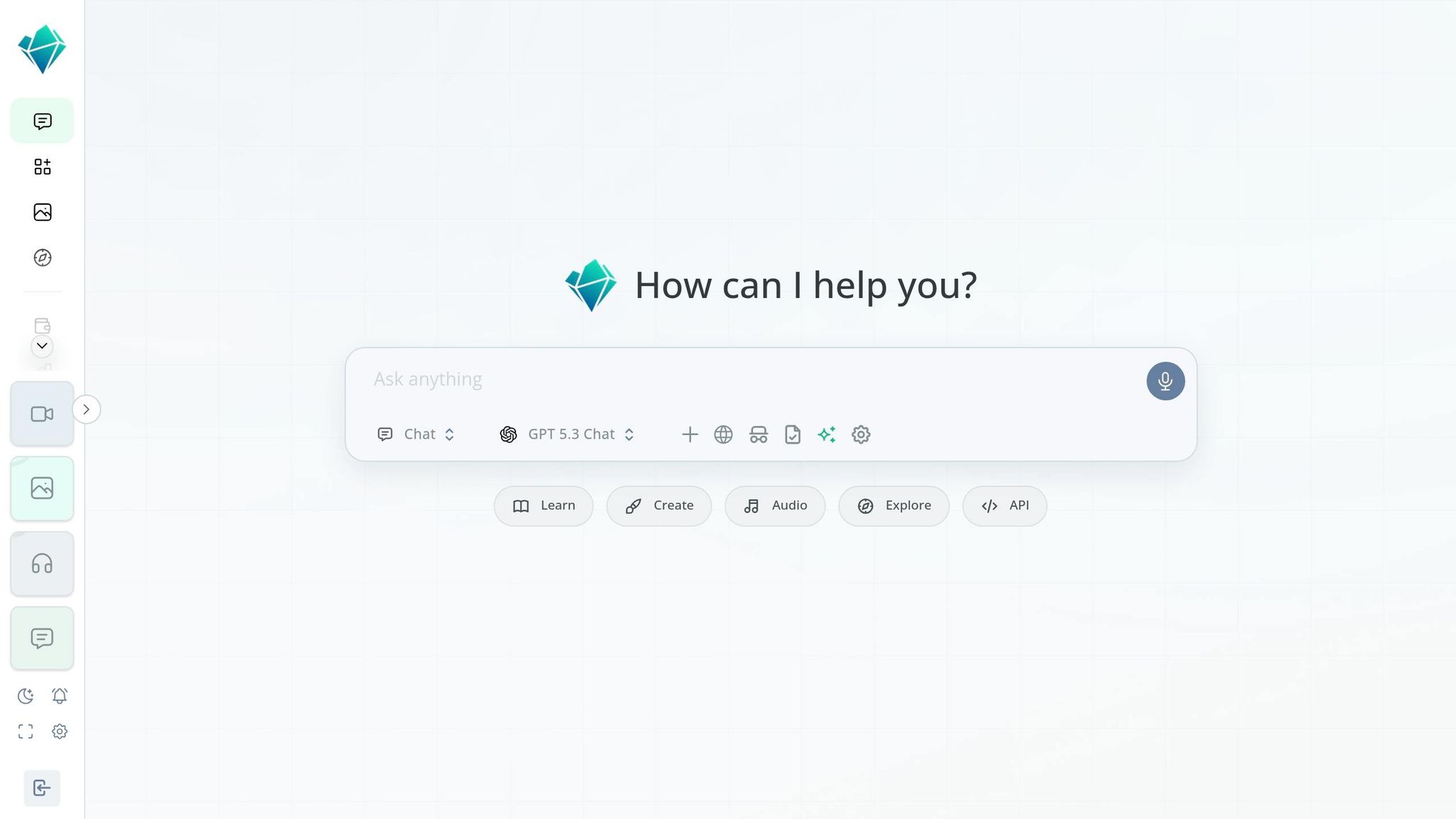
NanoGPT offers a flexible alternative to traditional subscription-based image generators. Instead of locking users into a monthly fee of $20 or more, it allows you to deposit as little as $0.10 and pay only for what you use. This pay-as-you-go model is perfect for creators who generate images occasionally or want to experiment with multiple AI models without committing to recurring payments.
With access to over 400 AI models, including popular ones like DALL-E, Flux, Stable Diffusion, and Midjourney, NanoGPT lets you switch between models mid-project to compare results or find the best fit for your needs. For example, generating an image with Flux Kontext Pro costs $0.044 per image, while DALL-E 3 Standard is priced at $0.04 per image. High-quality outputs typically require 2 credits per image.
Key Features of NanoGPT
NanoGPT supports both text-to-image and image-to-image workflows. It offers advanced capabilities like multi-image input and inpainting through an OpenAI-compatible API endpoint, making it easy to integrate into existing workflows. Users can fine-tune their image generations with parameters like strength, guidance scale, and inference steps, ensuring consistent and reproducible results.
Privacy is a top priority. By default, the API returns images as base64-encoded data, allowing users to store files locally instead of relying on NanoGPT's servers. If you choose hosted URLs, the platform ensures privacy by keeping files for only 24 hours, with download links expiring after about 1 hour. As the API documentation explains:
The returned data[i].url is a time-limited, signed download URL... It will expire after a short period (currently ~1 hour). If you need long-term access, download the image and store it yourself.
For users requiring additional confidentiality, NanoGPT also supports private TEE (Trusted Execution Environment) models for secure computations. Getting started is simple - just deposit credits and begin generating images.
The platform's features align perfectly with its flexible pricing structure, offering both advanced tools and ease of use.
Pricing and Usability
NanoGPT eliminates the need for monthly subscriptions altogether. New users receive a one-time bonus of 2 credits (equivalent to 1 image). For those with higher usage, optional yearly plans are available: Basic at $144/year (1,800 credits), Pro at $234/year (9,600 credits), and Max at $960/year (55,200 credits).
The platform accepts uploads of up to 4 MB in formats like JPEG, PNG, WebP, and GIF. You can access NanoGPT through alternative domains such as ai.bitcoin.com, bcashgpt.com, or cake.nano-gpt.com. Privacy-conscious users can stick to the default base64-encoded response format and ensure they download hosted images promptly. These features highlight NanoGPT's focus on affordability and ease of use for a wide range of creators.
Best Free AI Image Generators
If you're not ready to dive into a paid plan, there are plenty of free AI image generators in 2026 that offer solid tools. Each has its own strengths and quirks, making it easier to find one that fits your needs.
ChatGPT's free tier allows for about 2–3 DALL-E 3 images per day. It's perfect for quick sketches or brainstorming ideas. The conversational interface lets you describe what you want in plain English and tweak results step by step. It also comes with in-painting tools and an image library, which is great for beginners who want a straightforward experience.
Microsoft Designer (Bing Image Creator) gives you 15 "boosts" daily for faster image generation. After that, you can switch to a slower "standard mode" with unlimited creations. It uses models like DALL-E 3, MAI-Image-1, or GPT-4o and integrates well with other Microsoft tools. However, strict content filtering can limit creativity, and the output resolution is capped at 1024×1024 pixels.
Ideogram's free plan is a standout for creating images with clear, readable text. According to Listicler Reviews, "Ideogram solves the one problem that every other free AI image generator struggles with: putting readable text inside images". This plan includes 10 slow credits per day, resetting weekly, which equals around 40 images per week. Its "Magic Prompt" feature takes simple descriptions and turns them into detailed prompts. The downside? All free-tier images are public by default.
Playground AI's free tier shines with its high output capacity, letting you create hundreds of images daily. It combines image generation with a robust editor for erasing, mixing, and refining images all in one place - ideal for those who enjoy experimenting. The only catch is its steeper learning curve, especially compared to ChatGPT's user-friendly design.
Here's a quick comparison of these tools to help you decide:
| Tool | Daily/Weekly Limit | Best For | Main Limitation |
|---|---|---|---|
| ChatGPT | 2–3 images/day | Beginners & conversational editing | Very low daily cap |
| Microsoft Designer | 15 boosts/day (unlimited slow) | High volume needs | Heavy content filtering |
| Ideogram | ~40 images/week | Typography & logos | All images are public |
| Playground AI | Hundreds/day | Iterative editing & design | Steeper learning curve |
Best Paid AI Image Generators
Paid AI image generators offer advanced features, delivering high-quality results tailored to professional needs. From artistic excellence to brand consistency, here’s a breakdown of the top tools available.
Midjourney offers plans starting at $10 per month for the Basic tier, which includes around 200 images. The Standard plan, priced at $30, provides unlimited image generation in "Relax" mode, though processing times can vary between 1–10 minutes per image. For $60, the Pro plan adds "Stealth Mode", ensuring privacy for your creations. Midjourney v7 is praised for its artistic quality and cinematic lighting, though it struggles with text rendering. As the AIVidPipeline team observes:
Midjourney v7 remains the easiest way to get premium-looking images
ChatGPT Plus, priced at $20 per month, replaced DALL-E with GPT Image 1.5 in late 2025. This model allows users to refine images through simple voice commands rather than complex prompts. It scored 9.5/10 for text rendering and achieved a leaderboard score of 1,264 on LM Arena, just behind FLUX.2 Pro at 1,265. The plan supports approximately 80 prompts every three hours, with API access costing $0.04 per image for medium quality and $0.17 for high quality.
Adobe Firefly Premium is a go-to for commercial projects, seamlessly integrating with Photoshop and Illustrator. It ensures intellectual property safety by using licensed Adobe Stock and public domain data for training. Businesses using Firefly have reported a 60% reduction in design compliance risks. Pricing ranges from $5 to $55 per month, often bundled with Creative Cloud. While its generation speed can exceed one minute per prompt, its legal safeguards and integration with Adobe tools make it a top choice for professionals. Rose Calvert, a Visual Content Strategist at Acroan, highlights its strengths:
Adobe Firefly offers the strongest copyright indemnification since it trains exclusively on licensed content
Recraft Pro focuses on brand consistency, offering 1,000 credits and full commercial rights for $12 per month. It includes tools for creating brand kits with specific color palettes and typography, ensuring all assets align with your brand. The platform supports native vector (SVG) exports, perfect for scalable designs and print needs.
FLUX.2 provides three tiers: Klein, Pro, and Max, with API pricing starting at $0.014 per image for Klein and $0.055 for Pro. FLUX.2 Pro stands out for its text rendering accuracy and speed, generating high-quality images in about 4.5 seconds. It also achieved a leaderboard score of 1,265 on LM Arena.
Each of these tools caters to different professional priorities, from artistic flair and brand alignment to legal security and speed, making it easier to find the right fit for your specific needs.
Comparison Table of AI Image Generators
Choosing an AI image generator depends on what you need, your budget, and how it fits into your workflow. The table below highlights the differences between free and paid options in 2026, focusing on resolution, privacy, pricing, and ideal use cases to help you decide.
| AI Generator | Pricing | Max Resolution | Privacy (Free Tier) | Best Use Case | Commercial Rights |
|---|---|---|---|---|---|
| NanoGPT | Pay-as-you-go ($0.10 min) | 1,536 x 1,024 | Private (local storage) | Multi-model access without subscriptions | Full rights |
| ChatGPT (GPT Image 1.5) | Free (limited); Plus $20/mo | 1,536 x 1,024 | Private | Conversational, iterative editing | Full rights (Plus) |
| Midjourney V7 | Basic $10/mo; Pro $60/mo | 2,048 x 2,048+ | Public (stealth at $60+) | High-end artistic/stylized results | Full rights (paid) |
| Adobe Firefly 5 | Free (25 credits/mo); Standard $9.99/mo | 2,304 x 1,792 | Private | Commercial safety, Photoshop integration | Full IP indemnification |
| FLUX.2 Pro | Pay-per-image ($0.03–$0.07/MP) | 2,304 x 1,736 | Not applicable (paid only) | Professional realism, text accuracy | Full rights |
| Ideogram 3.0 | Free (10 credits/week); Plus $20/mo | 1,024 x 1,024 | Public | Graphic design with accurate text | Restricted (free) |
| Recraft Pro | Free (30 credits/day); Basic $12/mo | Vector (SVG) | Private | Professional graphic design, logos | Full rights (paid) |
| Microsoft Designer | Free (15 boosts/day) | 1,024 x 1,024 | Private (watermarked) | Quick social media visuals | Limited (watermarked) |
When picking the right tool, here are a few things to keep in mind:
- Privacy: Platforms like Midjourney and Ideogram often make free-tier images public, meaning your creations may be visible in public galleries. If privacy is a priority, consider options like NanoGPT, which stores data locally.
- Resolution and Watermarking: Free plans usually cap resolution and may apply watermarks to your images. Paid tiers remove these restrictions, offering higher resolutions - like Adobe Firefly's 2,304 x 1,792 - and watermark-free outputs.
- Speed and Commercial Rights: Free users may face delays of 8–20 minutes during peak times, while paid users typically enjoy faster generation speeds. Additionally, commercial rights are often limited or restricted in free plans, whereas paid options generally provide full rights and legal protections.
Performance and Feature Highlights
In 2026, the Gemini Nano Banana Pro earns an impressive 4.9/5 rating for its image realism capabilities. Meanwhile, the Nano Banana 2 dominates the LM Arena with an Elo score of 1,360. Speed is another standout feature, with Grok generating images in just 3 seconds and FLUX.2 Schnell delivering results in under 2 seconds.
NanoGPT simplifies access to leading models like Nano Banana 2, GPT Image 1.5, FLUX.2, and Seedream 5.0 through a single pay-as-you-go account. This eliminates the hassle of juggling multiple subscriptions, allowing users to seamlessly switch between models based on their specific needs. Adding to its appeal, NanoGPT prioritizes privacy by storing user data locally, ensuring both flexibility and security.
GPT Image 1.5 takes image editing to the next level by enabling modifications through natural language commands. For example, you could simply say, "move the subject to the left", to refine your image quickly and efficiently.
Free-tier options in 2026 have become more restrictive. Leonardo AI, for instance, offers 150 free tokens daily but includes queue times ranging from 8 to 20 minutes. Similarly, Adobe Firefly limits free users to just 25 credits per month. However, paid plans offer significant advantages, such as priority GPU access, resolutions up to 4K, and full commercial rights without watermarks. These features underscore NanoGPT's commitment to delivering both high performance and user-focused functionality.
For design-specific tasks, tools like Recraft V3 and Adobe Firefly stand out with advanced features such as vector exports, Generative Fill, and brand-consistent style sets. On the other hand, Ideogram 3.0 remains the go-to choice for text-in-image accuracy, excelling in rendering complex typography.
Choosing the Right AI Image Generator
Picking the best AI image generator in 2026 comes down to how often you’ll use it, the type of projects you’re working on, and how much control you want over your data.
Usage volume is key. If you’re generating images daily, look for tools with generous free tiers - like those that support over 100 images per day. For professionals building high-quality portfolios, Midjourney’s Standard plan ($30/month) offers unlimited "Relax mode" (with a wait time of 1–10 minutes), making it a cost-effective choice for consistent output. On the other hand, if you only need occasional image generation, pay-as-you-go models like NanoGPT are ideal. NanoGPT’s credit-based system ensures you’re only paying for what you use, making it adaptable to varying needs.
Commercial use requires extra care. For client-facing projects, Adobe Firefly stands out. It’s trained on licensed content and provides IP indemnification, making it a reliable choice for enterprise-level work. If your projects involve detailed typography, prioritize tools specifically designed for text clarity. Beyond project requirements, think about how your data is handled.
Privacy is another major factor. Many free tiers make generated images publicly accessible. For a more private experience, NanoGPT stores data locally on your device and even offers anonymous sessions without requiring an email address. If you need complete control over your data, Stable Diffusion is a strong option. It allows full local hosting, though you’ll need a GPU with at least 12GB of VRAM to run it effectively.
In 2026, multi-model platforms are becoming a popular choice. Why? Most users don’t want to juggle multiple $20/month subscriptions. NanoGPT’s pay-as-you-go model simplifies this by giving you access to a variety of advanced tools under one account. Whether you prioritize speed, image realism, or text accuracy, you can pick the model that works best for your needs.
Conclusion
By 2026, picking the right AI image generator comes down to three key factors: cost, features, and privacy.
For creators with diverse needs who generate images sporadically or require access to various specialized models, pay-as-you-go platforms like NanoGPT offer a practical solution. With its credit-based system, NanoGPT lets you tap into models like Flux Pro, Dall-E, and Stable Diffusion - all under one account. Whether you're making 10 images or 1,000, this flexibility helps avoid the hassle of monthly subscriptions.
Privacy is another major concern. Free tiers often make your generated images public by default. NanoGPT takes a different approach, storing data locally and offering anonymous sessions without requiring an email. This setup strikes a balance between ease of use and complete control over your data, sidestepping the need for self-hosting.
As the market evolves, tools are increasingly tailored for specific needs like text accuracy, photorealism, artistic styles, and licensing for commercial use. The smartest approach in 2026 isn’t about finding one perfect generator - it’s about choosing the right model for each task, keeping costs manageable, and ensuring your data stays secure.
FAQs
How do I choose an AI image generator for commercial work?
When choosing an AI image generator for commercial purposes, it's crucial to focus on platforms that provide clear licensing terms and usage rights. Look for features such as enterprise-grade IP indemnification or platforms that explicitly outline commercial usage rights. For instance, Adobe Firefly and Canva are known for ensuring proper usage rights, making them reliable options.
Additionally, platforms like NanoGPT, which offer pay-as-you-go pricing and local data storage, can be a good fit - provided their licensing terms align with your business requirements. Always double-check usage policies to steer clear of potential legal complications.
What should I check to keep my generated images private?
To keep your generated images private, check if the platform retains or shares metadata, like EXIF data, which could reveal sensitive details. Consider using tools or features that help remove metadata or encrypt images for added security. Also, make sure the platform follows proper data protection and privacy standards.
Is pay-as-you-go cheaper than a monthly plan for me?
Pay-as-you-go pricing, similar to NanoGPT’s approach, works well for users with low or inconsistent image generation needs. With this model, you’re charged only for what you actually use, eliminating the risk of unused credits. On the flip side, monthly plans are often a better fit for frequent users, as they provide a set quota for a fixed cost. If your usage varies or happens sporadically, pay-as-you-go can be a more budget-friendly option.