

Top 5 Async Methods for Faster AI Models
When working with AI models, slow response times can be frustrating - especially when handling multiple requests. But there’s good news: asynchronous methods can drastically reduce delays and improve efficiency. Here are five key async techniques to speed up your AI workflows:
asyncio.gather: Run multiple API calls in parallel, reducing total time to the slowest call instead of stacking delays.asyncio.as_completed: Process results as they’re ready, improving responsiveness for tasks with varying completion times.- Semaphore-based rate limiting: Control the number of concurrent requests to avoid overloading APIs and hitting rate limits.
- Asynchronous RLHF training: Split generation and training tasks across separate GPUs to eliminate idle time during model fine-tuning.
- Batch inference with
asyncio.gather: Group requests to process large datasets efficiently and cut down latency.
These methods can save you hours, reduce costs, and ensure your AI applications run smoothly - even under heavy workloads. Start small by implementing one of these techniques and measure the improvements before scaling further.
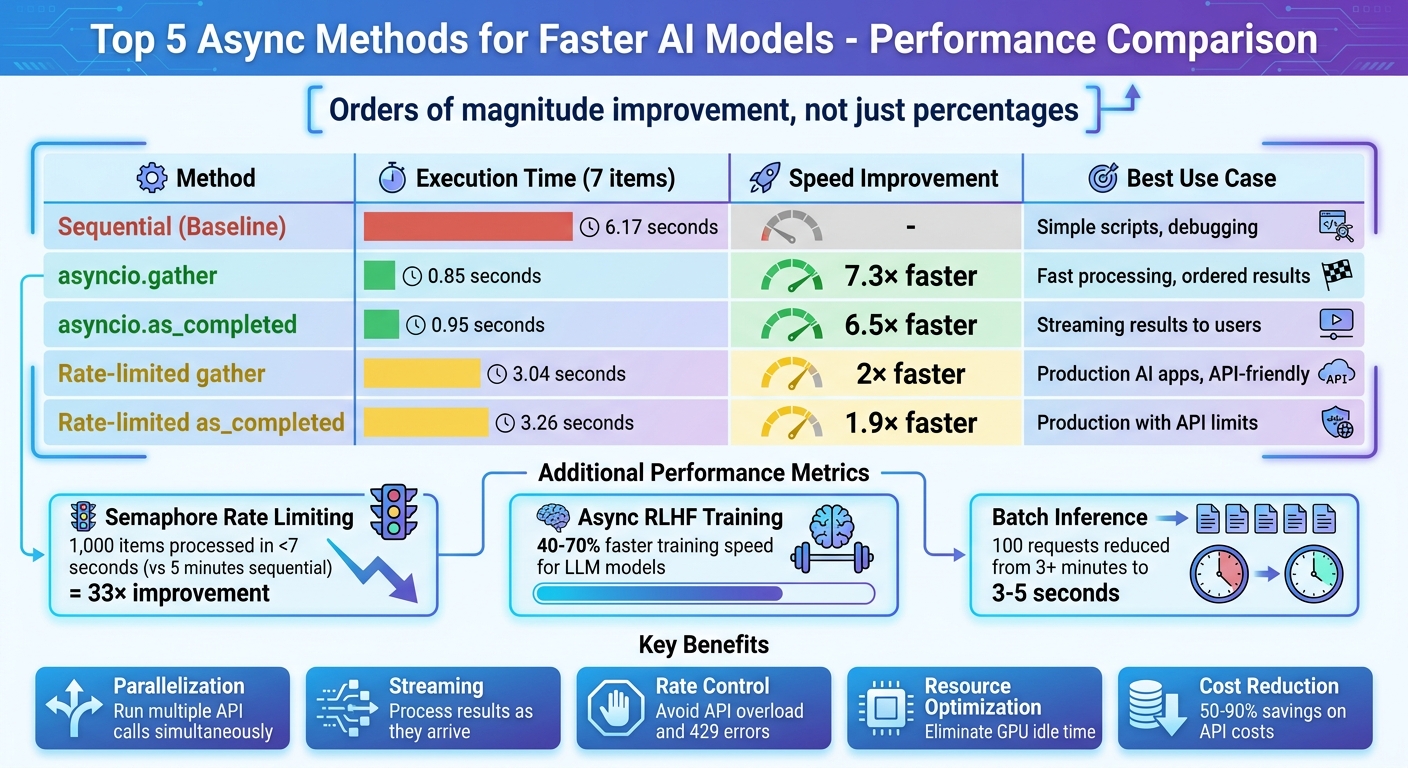
Performance Comparison of Async Methods for AI Models
Mastering Async/Await in Python for Agentic AI Workflows #async #agenticai #asyncawait
sbb-itb-903b5f2
1. Asyncio.gather for Parallel LLM Calls
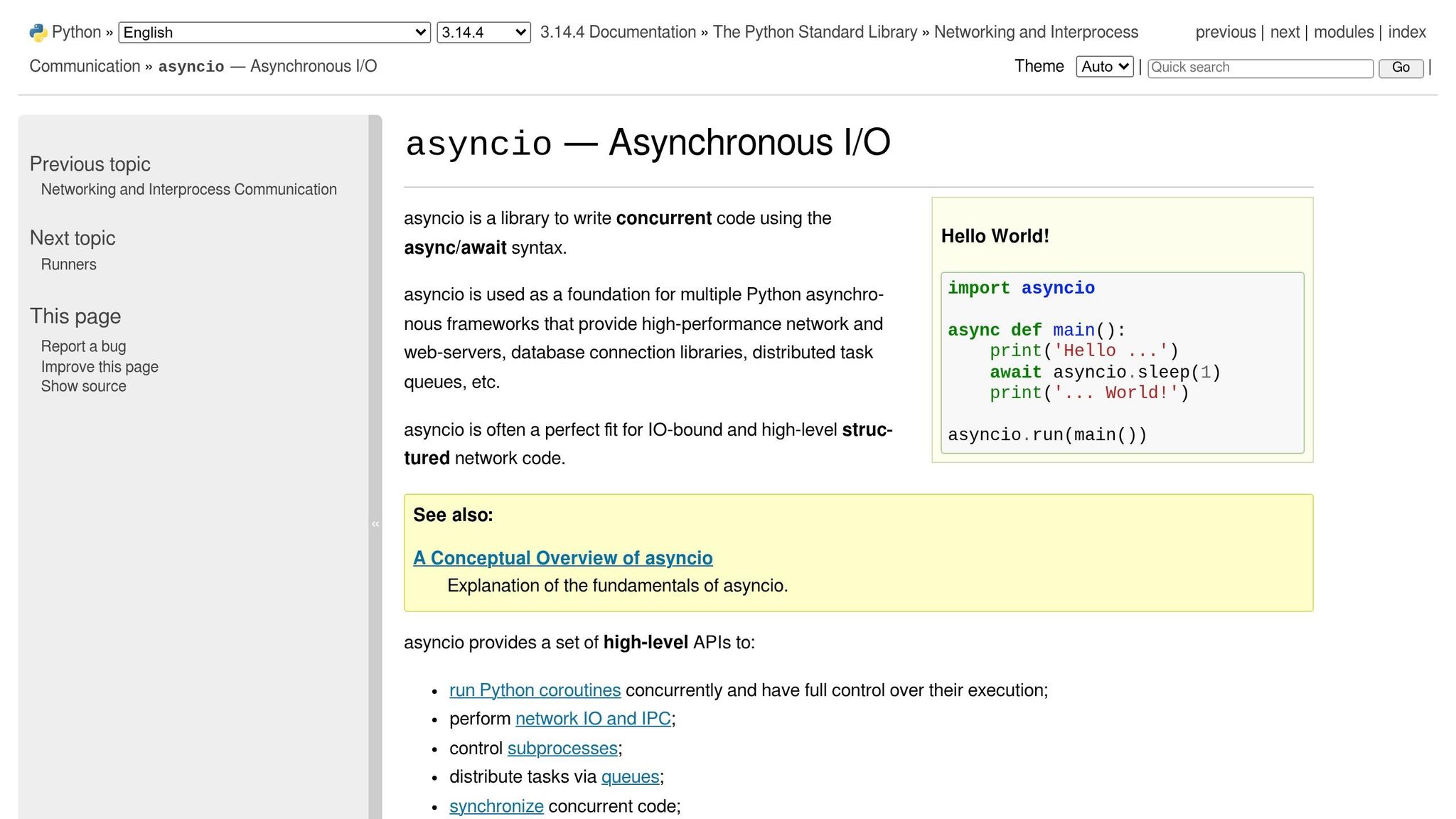
asyncio.gather is a powerful way to handle multiple LLM API calls at the same time. Instead of processing one request at a time, it allows you to launch all of them concurrently and then collect the results. This works exceptionally well because LLM calls are typically I/O-bound - most of the time is spent waiting on network responses rather than performing intensive computations.
For example, in a benchmark involving seven items, sequential processing took 6.17 seconds, whereas asyncio.gather completed the same task in just 0.85 seconds.
Efficiency in Reducing Response Time
The main benefit of asyncio.gather is how it overlaps latency. When making multiple API calls sequentially, the wait times stack up. But with asyncio.gather, all calls run at the same time, so the total execution time is roughly equal to the slowest call in the group . As Gabriele Medeot, a Machine Learning Researcher, puts it:
asyncio is the key to be able to run unlimited LLM API calls in parallel without blocking the Event Loop and freezing your CPU.
Another great feature is that asyncio.gather keeps the results in the same order as the input tasks. This makes it easier to map inputs to outputs - for instance, by pairing them using zip(prompts, results). This ordering consistency is especially useful when scaling up for larger AI workloads.
Scalability for Large AI Workloads
While asyncio.gather is efficient, firing off too many requests at once can lead to issues like 429 "Too Many Requests" errors . To avoid this, you can use an asyncio.Semaphore to cap the number of simultaneous requests . This keeps the workload manageable for the API provider while still ensuring high throughput.
| Method | Execution Time (7 items) | Concurrency | Best Use Case |
|---|---|---|---|
| Sequential | 6.17 seconds | 1 | Simple scripts, debugging |
| asyncio.gather | 0.85 seconds | 7 (Uncapped) | Fast processing, ordered results |
| Rate-limited gather | 3.04 seconds | 2 (Capped) | Production AI apps, API-friendly |
Source: Instructor Blog
By combining these strategies, you can ensure your AI pipelines stay efficient, even as the workload grows.
Ease of Integration into Existing AI Pipelines
One of the best parts about asyncio.gather is how easy it is to integrate into existing workflows. Use async-native clients like AsyncOpenAI to handle non-blocking I/O . Reusing a single client instance across calls can also speed things up by taking advantage of TCP connection pooling.
For error handling, set return_exceptions=True in asyncio.gather so that one failed API call doesn't disrupt the entire batch . You can also use asyncio.wait_for to enforce timeouts, ensuring a single slow request doesn't hold everything up . If you're working with large datasets, break them into smaller batches and add short pauses using await asyncio.sleep() to prevent overloading the API. These practices help maintain stability while making the most of the concurrency benefits of asyncio.gather.
2. Asyncio.as_completed for Streaming Results
Asyncio.as_completed is a game-changer for handling tasks in Python. It lets you process results as soon as they’re ready, without waiting for all tasks to finish. This function returns an iterator that yields results in the order they’re completed - so the fastest tasks finish first and get processed immediately.
Support for Concurrent Processing
The main perk here? Speed and responsiveness. Unlike asyncio.gather, which holds up everything until all the tasks are done, as_completed allows you to start working on outputs as they come in. For instance, in a benchmark involving 7 large language model (LLM) tasks, asyncio.as_completed completed in just 0.95 seconds, compared to 6.17 seconds for sequential processing. That’s a huge time saver, especially when dealing with time-sensitive or high-volume data. This ability to jump on results as they arrive makes it perfect for integrating with modern AI SDKs.
Streamlined Integration for Real-Time Processing
Using as_completed with modern AI tools is straightforward. Just pass your list of coroutines to as_completed and loop through the results using a standard for loop. Important note: don’t use async for here - as_completed returns a traditional generator, not an async one.
For production environments, combine as_completed with an asyncio.Semaphore to limit the number of concurrent requests and stay within API limits. You can also use the timeout argument to prevent slow requests from stalling your entire process.
| Method | Execution Time (7 Items) | Primary Use Case |
|---|---|---|
| Sequential | 6.17 seconds | Baseline/Simple scripts |
| asyncio.gather | 0.85 seconds | Fast processing, ordered results |
| asyncio.as_completed | 0.95 seconds | Streaming results to users |
| Rate-limited as_completed | 3.26 seconds | Production AI apps with API limits |
Source: Instructor Documentation
This method shines when you need real-time results, whether it’s streaming AI outputs to users, feeding data into other models, or tackling massive datasets where waiting for everything to finish would waste precious time.
3. Semaphore-Based Rate Limiting
Semaphore-based rate limiting is a technique used to manage concurrent AI requests, ensuring that operations run smoothly without overwhelming the system. Think of it like a bouncer at a club - only a set number of tasks are allowed in at once, while others wait their turn.
Support for Concurrent Processing
Semaphores are great for maintaining a steady flow of tasks without the bottlenecks of traditional batch processing. Unlike batch systems - where the slowest task can delay the entire group - semaphores allow new tasks to start as soon as others finish. For instance, setting a semaphore limit of 10 ensures there are always about 10 tasks running concurrently, minimizing downtime. Switching to an asynchronous model with 50 concurrent requests drastically improved processing speed, cutting the time for 1,000 items from 5 minutes to under 7 seconds - a 33× improvement. This method not only prevents overload but also boosts overall efficiency.
Efficiency in Reducing Response Time
Managing concurrency with semaphores can save both time and money. By keeping API requests under control, semaphores help avoid exceeding rate limits, which many providers, like OpenAI, cap at around 3,500 requests per minute. Exceeding limits can result in HTTP 429 errors, wasted tokens, and costly retries. One implementation reduced AI request times from 80 seconds to just 10 seconds. When paired with early termination logic, this approach can also cut costs by 60% to 90% by avoiding unnecessary API calls.
Ease of Integration into Existing AI Pipelines
Adding semaphores to your code is relatively simple. In Python, you can use asyncio.Semaphore(n) within an async with block, which automatically manages the internal counter. For Node.js, the p-limit package provides similar functionality .
"A Semaphore is like a bouncer at a club with a limited number of open spots. It controls access to a resource... by allowing only a certain number of tasks to access it at a time." - Pratap Ramamurthy, AI Specialist Engineer, Google Cloud
To get started, set a conservative limit of 5–10 concurrent requests. Monitor for HTTP 429 errors and gradually increase the limit as needed . Combine semaphores with exponential backoff strategies to handle temporary failures . Also, avoid creating all tasks upfront - use lazy task creation within a loop so requests are sent only when capacity is available. When integrated correctly, semaphores work well alongside other asynchronous techniques, further reducing response times for AI models.
4. Asynchronous RLHF Training
Asynchronous RLHF training takes the concept of asynchronous processing - commonly used for API calls - and applies it to the training phase, making better use of idle hardware.
In traditional synchronous Reinforcement Learning from Human Feedback (RLHF), GPUs often sit idle for long stretches while the model generates text responses. For example, generating a batch of 32,000-token rollouts on a 32B model can take up to 3.7 hours on a single H100 GPU, leaving training hardware inactive during that time. Asynchronous RLHF solves this problem by running generation and training processes in parallel, using separate GPU pools.
Efficiency in Reducing Response Time
The time savings are impressive. In October 2024, researchers Michael Noukhovitch and Shengyi Huang demonstrated a 40% faster training speed when using asynchronous RLHF to train a LLaMA 3.1 8B model on an instruction-following task, compared to traditional synchronous methods. For reasoning tasks, asynchronous RLHF achieved even greater efficiency, fine-tuning a Rho 1B model on GSM8k 70% faster than synchronous approaches.
"Standard RLHF is forced to be synchronous: online, on-policy RL. To take advantage of LLM generation libraries and efficiencies (e.g. vllm), we put generation and training on separate GPUs. This makes training off-policy but allows us to achieve big speedups." - Michael Noukhovitch, Paper Author
By separating generation from training, asynchronous RLHF ensures that the inference pool continuously generates new batches while the training pool computes gradients, eliminating the delays caused by batch dependencies.
Scalability for Large AI Workloads
This approach shines when scaling up for larger AI workloads. Because generation and training are handled independently, GPU resources can be allocated based on specific workload needs. For instance, if inference requires eight times more compute than training, GPUs can be distributed accordingly, avoiding idle training hardware. The architecture uses separate GPU pools, coordinated by frameworks like Ray, which is now employed by half of the major open-source RL libraries.
Even with off-policy data, performance remains stable. Research shows that Online Direct Preference Optimization (DPO) retains accuracy as training speeds increase, making asynchronous RLHF a practical choice for production environments. For context, a 7B model achieves around 6,300 output tokens per second on an H100 GPU, while a 32B model processes about 1,200 tokens per second - highlighting the need for separating generation and training workloads.
This structure not only boosts efficiency but also integrates smoothly into existing AI systems.
Ease of Integration into Existing AI Pipelines
Modern tools make it easier than ever to incorporate asynchronous RLHF into AI workflows. Hugging Face's TRL library, for example, includes an AsyncGRPOTrainer that mirrors the API of traditional synchronous trainers, allowing developers to adopt the new method with minimal code changes. The process involves partitioning GPUs between the vLLM server and the trainer using environment variables like CUDA_VISIBLE_DEVICES to prevent resource conflicts.
Weight synchronization is handled through NCCL broadcast, which updates model weights from the trainer back to the inference engine in just 100–500 milliseconds. To address "staleness" - the lag between generating and training policies - bounded queues are used to ensure that outdated samples are dropped before they can affect the training process. Additionally, tuning the max_inflight_tasks parameter based on batch size and gradient accumulation steps helps avoid generating unnecessary or outdated data.
These thoughtful design choices make asynchronous RLHF not only efficient but also practical for real-world AI development workflows.
5. Batch Inference with asyncio.gather
Using asyncio.gather for batch inference allows multiple requests to run at the same time, cutting the total processing time down to the duration of the slowest request. This method is particularly effective for handling large volumes of I/O-heavy tasks, such as calling APIs for large language models (LLMs) or retrieving embeddings, where waiting for responses takes up most of the time.
Efficiency in Reducing Response Time
Tests repeatedly show that batch inference with asyncio.gather significantly shortens processing times compared to running tasks one after another. For example, if you're processing 100 documents with each request taking 2 seconds, a sequential approach would take over 3 minutes. Asynchronous execution, however, reduces this time dramatically.
Support for Concurrent Processing
With asyncio.gather, coroutines are scheduled to run simultaneously, and results are returned in order. By setting return_exceptions=True, you can ensure that a single failure doesn’t stop the entire process. Many modern AI libraries, like AsyncOpenAI and AsyncAnthropic, are built to support awaitable coroutines, making it easy to incorporate them into Python workflows.
Scalability for Large AI Workloads
To handle large datasets efficiently, divide your data into smaller batches - usually groups of 10 to 20. This prevents overloading APIs, ensures high throughput, and avoids hitting rate limits. Similar to rate-limiting strategies using semaphores, batching helps manage API calls effectively. Always pair your asyncio.gather tasks with an asyncio.Semaphore, limiting concurrent requests to 5 or 10 to avoid 429 Rate Limit errors. For extremely large datasets, avoid launching thousands of tasks simultaneously. Instead, process them in smaller batches with short asyncio.sleep intervals between batches to distribute the load more evenly.
Wrapping It Up
The five asynchronous techniques we’ve explored can dramatically reshape how your AI applications manage processing time and resources. Here’s a quick recap:
- Parallelization with
asyncio.gather: This turns sequential waits into concurrent execution, cutting down the time for 100 requests from minutes to just 3–5 seconds. - Streaming with
asyncio.as_completed: Delivers results as they’re ready, reducing perceived wait times to under a second and improving user experience. - Semaphore-based rate limiting: Helps maintain stability by preventing 429 errors and ensuring compliance with provider limits.
- Asynchronous RLHF training: Keeps heavy tasks off the main thread, ensuring your app stays responsive.
- Batch inference: Groups multiple requests together, significantly reducing both latency and costs - often by 50% when leveraging native batch APIs.
By adopting future and promise-based concurrency models, you can achieve faster response times while maintaining clean, scalable code.
"The performance difference between well-structured async code and naive sequential code is frequently measured in orders of magnitude, not percentages." - EngineersOfAI
Start small: convert one high-latency endpoint to async and measure its throughput before scaling. For high-volume tasks, use semaphores to avoid overloading connection pools. When working with large datasets, implement checkpointing every 10–50 completions to ensure your job can resume seamlessly after a crash.
And here’s a pro tip: Reducing output tokens is far more impactful than trimming input tokens. Cutting output tokens by 50% slashes latency by the same amount, while reducing input tokens by 50% only improves latency by 1–5%. For routine tasks, opt for smaller and faster models like GPT-4o-mini or Claude Haiku. Finally, manage retries effectively with exponential backoff and jitter.
FAQs
When should I use asyncio.gather vs asyncio.as_completed?
asyncio.gather is perfect when you need to run several tasks at the same time and want the results to be returned in the same order as the tasks were started. This makes it ideal for scenarios where maintaining the order of results is important or when you need all tasks to complete before moving forward.
On the other hand, asyncio.as_completed shines when you want to process results as soon as they are ready, without waiting for all tasks to finish. This approach works well when tasks take different amounts of time, and handling results early can enhance responsiveness or efficiency.
How do I pick a safe semaphore limit to avoid 429 errors?
To steer clear of 429 errors, it's a good idea to set a semaphore limit just below your API's rate threshold. Keep an eye on system metrics like response times and error rates, and make gradual adjustments to maintain a safe margin. For instance, if the API permits 5 requests per minute, you might set your limit to 4 or 4.5 requests. Also, implementing exponential backoff retries can help your system recover smoothly when you hit those limits.
What do I need to run asynchronous RLHF across multiple GPUs?
To efficiently run asynchronous RLHF (Reinforcement Learning with Human Feedback) on multiple GPUs, you’ll need to configure a few critical components:
- Enable an asynchronous engine: Tools like vLLM are designed for this purpose.
- Set up importance sampling correction: This ensures accurate updates when working asynchronously.
- Disable colocated inference: Prevent inference processes from being tied to specific GPUs to improve flexibility.
- Configure async GRPO: Proper setup of asynchronous Generalized Policy Optimization is essential.
Two key parameters you’ll want to focus on are:
max_trajectory_age_steps: Controls how long trajectories are retained.in_flight_weight_updates: Manages the number of weight updates in progress.
Make sure these parameters are fine-tuned in your setup to get the best performance out of your system.